


Product Description
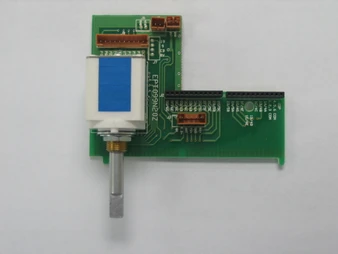
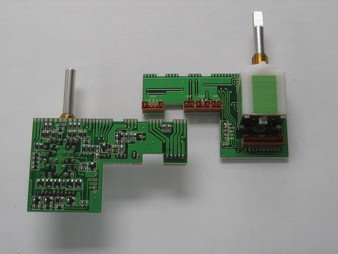
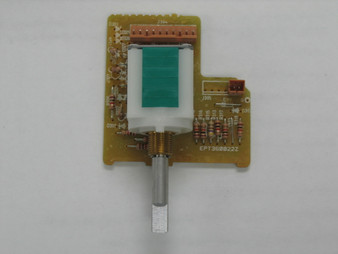
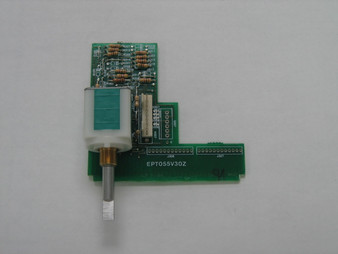
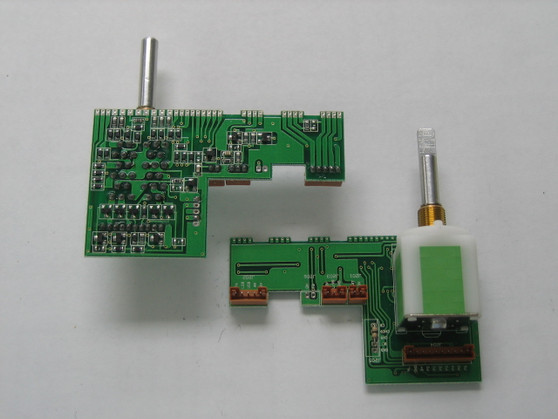
Galaxy DX-979 Channel Selector PCB Assembly (Part # T-145X3-P06 / Board # EPT092921Z)
Restore crisp, positive channel stepping, accurate PLL BCD logic switching, and reliable front-panel tuning to your mobile transceiver with this genuine OEM Galaxy DX-979 Channel Selector PCB Assembly (Factory Assembly Part Number T-145X3-P06, Circuit Board Number EPT092921Z). Engineered specifically for the compact Galaxy DX-979 chassis architecture, this complete rotary encoder and tuning sub-assembly mounts directly behind the front sub-panel to resolve skipped channels, erratic frequency jumps, and worn rotary switch contacts without component-level desoldering.
⚠️ SHAFT TORQUE, HARNESS POLARITY & NO-RETURN POLICY WARNINGS
• Mechanical & Shaft Protection: Do not over-tighten the front panel hex retaining nut on the rotary shaft during reassembly, as excessive torque can bind the mechanical detent mechanism or crack the mounting PCB.
• Static-Sensitive & Harness Verification: Observe proper electrostatic discharge (ESD) precautions when handling this channel selector PCB, and verify all multi-pin wire harness connectors and PLL logic lines against your original assembly before applying power.
• No-Return Policy Notice: Due to precision rotary selector contacts, PLL logic lines, and multi-pin wire harnesses involved, electronic front-panel sub-assembly boards are strictly non-returnable once installed, soldered, or powered up.
Product Specifications & Technical Data
- Manufacturer / Brand: Galaxy / Ranger (Factory OEM Service Replacement Part)
- Factory Assembly Part Number / SKU: T-145X3-P06
- PCB Board Number / Silkscreen: EPT092921Z
- Component Designation: Front Panel Rotary Channel Selector & Tuning Printed Circuit Board Sub-Assembly
- Function: Generates binary/BCD channel switching logic to control the PLL synthesizer and front-panel channel/frequency readout
- Mounting & Fitment: Direct Factory Front Sub-Panel Replacement for Galaxy DX-979 Mobile Transceivers
- Quality Standard: 100% Genuine Factory Original Equipment Manufacturer (OEM) Electronic Component
- Compatible Radio Models:
- Galaxy Mobile Transceivers: Galaxy DX-979, Galaxy DX-979B (and compatible compact Galaxy chassis utilizing EPT092921Z / T-145X3-P06 channel selector modules)
Installation & Bench Notes
- Diagnoses & Solves: Skipped or repeating channel numbers when rotating the selector knob, erratic PLL frequency jumping, dead/unresponsive channel stepping, and bent or broken rotary selector shafts.
- BENCH INSTALLATION PROCEDURE:
- Disconnect the 13.8V DC power cord and antenna coaxial cable from the transceiver chassis. Remove top and bottom cabinet covers to access the front sub-panel assembly.
- Carefully pull off the Channel Selector knob and adjacent front-panel knobs as needed, then remove the hex retaining nut and dress washer securing the channel selector shaft to the front sub-panel.
- Photograph and label all multi-pin wire harnesses and PLL logic leads connected to the existing EPT092921Z board before unplugging or desoldering.
- Remove any rear mounting screws and slide the faulty channel selector PCB assembly straight back out of the front sub-panel cutout.
- Insert the new EPT092921Z (T-145X3-P06) assembly squarely through the front panel opening, install the dress washer and hex retaining nut, and hand-tighten gently until snug.
- Reconnect all wire harnesses strictly according to your reference photos. Apply power on the bench, verify positive mechanical detent feel, and confirm accurate 1-through-40 channel stepping on both the channel display and frequency counter before reinstalling the knobs and cabinet covers.